giovedì 14 luglio 2011

Installing new Android Market 3.0.26 on Archos Gen8 devices

Installing new Android Market 3.0.26 on Archos Gen8 devices: "


Google has recently announced a major 3.0 update for their Android Market. This new version gives you new ways to find great applications and games , purchase books and rent movies.


This update will require Android 2.2 devices and will be deployed in the coming weeks.

No need to wait with Arctablet, we are offering the 2 ways to install the Market:

- you can download Android Market 3.0.26 APK and install it yourself.

- or follow the installation procedure using ArcTools (prefered method)


Installation procedure using ArcTools

This part goes thru the procedure to install latest Android Market 3.0.26 on Archos Generation 8 devices. Please note that this is valid only on Archos Gen8 devices (Archos 28, Archos 32, Archos 43, Archos 70 and Archos 101 Internet Tablet). It has been tested on stock devices and does not require a specific firmware or root access to your tablet.


Installing the Market using this method does not void your warranty
and should not cause data loss or system problems.


WE WILL NOT BE HELD RESPONSIBLE FOR ANY DAMAGE TO YOUR DEVICE.
USE THIS PROCEDURE AT YOUR OWN RISK.


Detailed procedure


  • Step 1: This procedure is valid for devices having an existing Android Market installed (version 2.2.7 and up) thru ArcTools or other ways. Please refer to ArcTools Market installation procedure


  • Step 2: Start ArcTools from the Applications list


  • Step 3: Select “Default Apps & Market v3.0.26” from the list (it should be selected by default)


  • Step 4: Press Download button


    The application should now start to download the installation archive, it will take a few seconds


    When finished you should see the message “Download complete, please now press ‘Install Apps’ button


  • Step 4: Press Install Apps button


    After a few seconds it should display “Install complete, please reboot


  • Step 5: Reboot your device


  • Step 6: Start Android Market


Enjoy your new Android Market 3.0.26


Please comment this article to let us know how it went for you.

Search

"

martedì 12 luglio 2011

Wireless Network Watcher, Find Out Who Is Connected To Your Wi-Fi Network

Wireless Network Watcher, Find Out Who Is Connected To Your Wi-Fi Network: "

Wireless network connections have become popular in past years, thanks to an increasing number of devices that utilize wireless connections. But there is a problem associated with it, or more precisely with the securing of wireless routers and devices to block unauthorized access: The device needs to use proper encryption to block third parties from accessing it. Many users do not know the differences between WEP or WPA encryption, or which of the encryption schemes they should select for best security.

That could leave their wireless routers open for unauthorized access, especially if no encryption or weak encryption is configured.

The best option here is to use the strongest encryption possible. That however may not be always possible, if devices that need to connect to the wi-fi router do not support that.

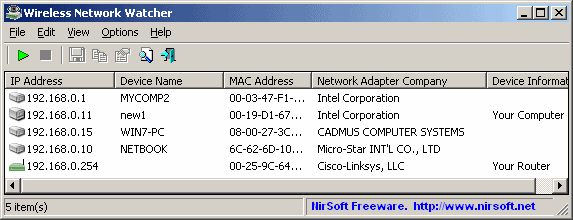
Wireless Network Watcher is a free software program that scans a wireless network for connected computer systems. It displays all computers that are currently connected to the network in its interface, making it dead easy to identify unauthorized access to the network.

wireless network watcher

Each connected device or computer is represented with an IP address, device name, MAC address, company that created the network adapter and device information. These information can be exported and saved to various formats including html, xml and text files.

The program is fully compatible with 32-bit and 64-bit editions of the Windows operating system. It supports all Windows versions from Windows 2000 to Windows 7, including Windows Server versions.

The program can only scan the wireless network the computer it is running on is connected to. Users who want to scan a network that they are not connected to need to connect to it first before scanning it.

It can happen that the wrong wireless network adapter is identified by the program. It is possible to select the right one under Advanced Options (F9).

Wireless Network Watcher is a portable program that will start the scan automatically right after it has been started. It can take a few seconds before the list is populated.

Windows users can download the program from the official website over at Nirsoft.


© Martin Brinkmann for gHacks Technology News | Latest Tech News, Software And Tutorials, 2011. | Permalink |
Add to del.icio.us, digg, facebook, reddit, twitter
Post tags: , , , , ,


"

sabato 2 luglio 2011

Edge HD2 Mini PC is an HTPC that hides behind your TV

Edge HD2 Mini PC is an HTPC that hides behind your TV: "

Edge HD2 mini pc is an HTPC that hides behind your TV

When it comes to home theater PCs, size matters -- and it doesn't get too much smaller than Sapphire's original Edge HD mini PC, pictured above. In fact, Sapphire saw no reason to fiddle with the Edge's diminutive form factor when designing the HD2, and instead poured itself into improving the HTPC's specs. Not only is the updated mini-rig small enough to mount behind your HDTV, but it also packs a 1.8GHz dual-core Intel Atom, 2GB RAM, and a 320GB hard drive. All this (and 1080p VGA / HDMI out, of course) at 30W, '20 times less power than a typical desktop PC,' according to Sapphire. No word on price (or pics, for that matter), but feel free to jump past the break for an official press release with full specifications.

Continue reading Edge HD2 Mini PC is an HTPC that hides behind your TV

Edge HD2 Mini PC is an HTPC that hides behind your TV originally appeared on Engadget on Thu, 30 Jun 2011 22:40:00 EDT. Please see our terms for use of feeds.

Permalink The Inquirer | sourceSapphire | Email this | Comments


"

venerdì 1 luglio 2011

Gli inquietanti suoni del modem 56k

Gli inquietanti suoni del modem 56k: "


Vi ricordate il classico suono del modem 56k quando cercava di connettersi? In questo video la sequenza è stata rallentata del 700%. Il risultato è una serie di suoni inquietanti, che sembrano essere tratti dal più agghiacciante film dell’orrore. Si, lo ammetto, ho un po’ esagerato anche perchè ricordo benissimo che il vero “orrore” era osservare lo schermo perfettamente fermo, mentre gli scatti telefonici continuavano a salire indisturbati… era così anche per voi, vero?


Via | MyProps


Gli inquietanti suoni del modem 56k é stato pubblicato su Downloadblog.it alle 15:27 di venerdì 01 luglio 2011.


"

giovedì 30 giugno 2011

The world’s craziest basketball court is in Munich

The world’s craziest basketball court is in Munich: "

The world’s craziest basketball court is in Munich


There is a basketball court in Germany that is about to blow your mind.


We're not sure, outside of displaying one's artistic integrity, why someone would choose to make a 3D-styled basketball court featuring lumps and lamps and all sorts of weirdness, but we do appreciate the results. Because it gives us an excuse to wonder what it would be like to play basketball on a court like this:


The world’s craziest basketball court is in Munich


Or this:


The world’s craziest basketball court is in Munich


Or this:


The world’s craziest basketball court is in Munich


Whoa, man. Here's a description of the court, from inges idée:


A regulation-sized basketball court was erected on the grove-like forecourt of the school building of the occupational school. The court consists of a soft orange-red tartan covering and two normed baskets and seems to be forced over the grid of the lamps that have been set up. The playable court has been 'morphed' as in a 3D program on a computer and looks like the grounds of a rollercoaster, with heights and depths and calm and dynamic zones. The resulting paradox, which moves between a normative set of rules and pleasurable, anarchic change, requires creative engagement for its use.


It's best if you read the preceding paragraph with the appropriate accent.


Also, we can only hope that Dirk Nowitzki never sets foot on this court. We like his ankles the way they are.


(Images courtesy of Markus Buck)


Follow Yahoo! Sports on Facebook and be the first to know about the most interesting stories of the day.


Other popular Yahoo! Sports stories:

HS football star killed after graduation

Video: The best first pitch you will ever see

Fan's incredible throw after homer

"

Smart Design: Switch Plug Saves Power [PICS]

Smart Design: Switch Plug Saves Power [PICS]: "


Take one look at this Switch Plug and you’ll immediately see its value. Plug it in while the switch is in its off position, and there’s less of a chance of sparks or shocks.

Once you plug it in, flip the switch and its LEDs light up, reminding you that there’s energy flowing through that plug, perhaps encouraging you to turn it off when not in use. Our only quibble: those LEDs better draw very little power, lest they defeat the Switch Plug’s energy-saving purpose.

Designer Gonglue Jiang, currently studying at the Harvard Graduate School of Design, is onto something with this design concept. The idea could be especially useful if the technology were installed on those AC adapters that act like vampires, suck sucking power 24/7, even when you’re not using the device to which they’re attached.

This is not Jiang’s first encounter with plugs — he also created this colorful design he calls “Infinite USB,” giving you the ability to daisychain USB plugs, solving that problem of the reduced number of USB ports on many laptops:


Infinite USB


Infinite USB


Switch Plug


Switch Plug


Switch Plug


[via Yanko Design]

More About: design, design concept, Gonglue Jiang, infinite USB, Switch Plug, vampire power

For more Tech & Gadgets coverage:


"

Discover Last30Days-Skill: The AI Search That Reads the Reality of the Last 30 Days!

🚀 🤖 💻 ⚡ 🎯 🧠 🔧 📦 🐍 📊 🏆 🔗 ⭐ 👉 LAST 30 DAYS SKILL: YOUR ULTIMATE AI SEARCH! Have you ever wanted to know what is really happeni...